IRL CAM
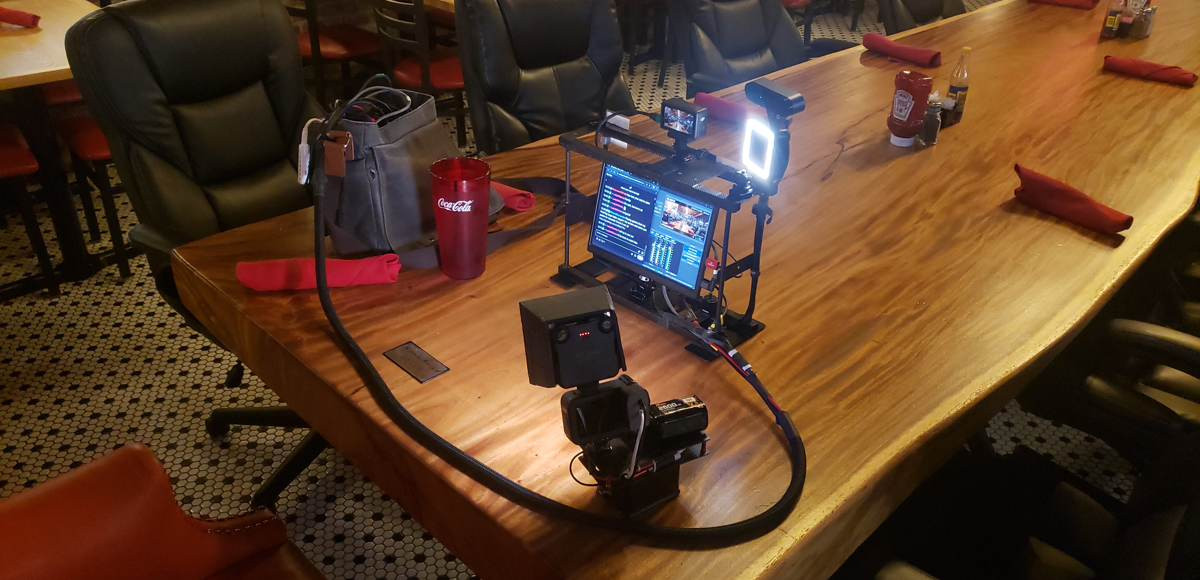
IRL CAM v2 at a diner. Shown are the 6-pound shoulder bag, optional command center, and Wireless Webcam v3.0. OBS is running locally and streaming all 3 cams simultaneously.
The IRL CAM v2 is NOT an IRL Backpack! It is FAR superior...
Overview
- Does NOT use your phone.
- 6-pound shoulder bag, weighs less than your mom's purse.
- Runs Windows 11 or Linux and the full version of OBS Locally!
- Streams up to 3 cameras simultaneously, split, picture-in-picture, etc.
- 4 hour runtime per battery, supports battery hot-swap while streaming!
- Supports scenes, text, browser sources, Streamlabs, Stream Elements, Sound Alerts, pretty much anything you do in OBS at home.
- Supports Bluetooth headsets, headphones, microphones, etc.
- Uses any available internet- Wifi, Ethernet, 4G/5G modem, Bonded devices, etc.
- Records your stream on a built-in SSD. If your internet goes in and out, or you drop frames, you still have a perfect copy of your stream to edit later!
- Can power external USB-C devices like a ring light, monitor, camera, etc.
- You can charge your phone with its QC 2.0 port (will reduce stream run time)
I'm gonna teach you how to build one
I've been working on the IRL CAM for 3 years while actually USING IT for a 3 or 4 hour livestream on Twitch almost every Friday. This isn't some untested kickstarter project. I learned about the constant stress on components from moving, walking, pushing through crowds, getting in and out of vehicles, dealing with heat, humidity, and drunk people. I broke things, saw why they broke, and made them better.
I want this to be an open source project. I don't like seeing people pay ridiculous money for something that doesn't do half the things it should do, locks you into some crazy monthly plan, or forces you to use proprietary batteries or other components that are marked up 400% because you can't use anything else.
I really want to share the IRL CAM with actual streamers who want to use it. I might use a CC BY-NC license but I'm still figuring that out. I might sell parts as kits or I could build and sell the difficult components (like the PSU), then tell you where to buy the other parts. If you have any questions, please feel free to contact me!!
More Detail
- The IRL CAM is a customized Mini PC with an Intel processor that supports Quicksync. Without it, you wouldn't be able to run a heavy, resource intensive program like OBS. My initial builds ran at 100% CPU and overheated... but I fixed that...
My current build runs at ~60% CPU with OBS running 3 cameras at the same time, multiple browser sources for local weather, Streamlabs, Stream Elements, Sound Alerts, my own GPS app, and a full Chromium browser running for chat (I like having chat in a separate browser).
- OBS is RECORDING the stream to a local SSD while streaming it to Twitch. You have a clean copy of your stream even if your internet goes in and out. Of course you don't have to stream, you can just record and edit later.
- The IRL CAM runs Windows 11 or Linux. I built two versions with identical hardware and used them side by side. The Linux version gives you roughly 10% more battery runtime, but it doesn't support all of the things people do with OBS on Windows 11.
- The IRL CAM does not use your phone! This means you can use your phone to take calls, answer texts, pay for parking, use maps, and do whatever you need to do with your phone. You can check the quality of your stream on your phone or check discord. I LOVE having my phone completely separate from my IRL CAM!
- The IRL CAM is completely modular and you are NOT forced into using any specific camera. It works with a $25 Logitech webcam or a $3000 DSLR, or BOTH. In my recent streams, I use (at the same time) a Logitech BRIO webcam, a GoPro 10, and DJI OSMO Action 5 Pro. I use the BRIO pointed at my face while I can switch between the other 2 cameras by switching scenes in OBS.
- Want HANDS FREE? Just wear a GoPro or other action cam on a chest mount, helmet mount, etc. and carry the shoulder bag. Normally, I look at chat on a 10 inch monitor where I can also see OBS, mic levels, signal strength, dropped frames, etc. But you can also look at chat on your phone in the Twitch app.
- The one thing I had to build from scratch is my custom PSU (Power Supply Unit). It accepts almost any brand 6S Li-ion DRONE battery because I didn't want to be tied to some proprietary nonsense. My PSU provides regulated 12v for the Mini PC and enough amps to also power cameras, wireless microphones, 4G/5G modem, a 10 inch monitor, and any other USB-C accessories I need to power. I can easily stream for 4 hours with everything running at the same time and I've proven it in many streams.
- You do NOT NEED some crazy expensive mobile data plan!! I added a second line to my T-Mobile account, got a discount for the second line, and I just use a Netgear Nighthawk modem. IRL CAM is a full Mini PC so you can use anything that you would connect to a laptop for internet. I don't use the battery inside the Nighthawk because it gets hot and causes drops, so I power it with my custom PSU.
Stay Tuned
That's all for now. I have a LOT to do. If you want to see my IRL CAM in use, I'm usually out on the streets on Friday nights from 9pm to 1am EST. I'd love for you to come by and ask me questions!! https://www.twitch.tv/rob215x
Thanks,
Rob
Contents
Coming Soon!
I'll probably build some different pages about the IRL CAM and they will go here!