
Controller Battery Level on Linux
2026 Nov 26 | ALL POSTS
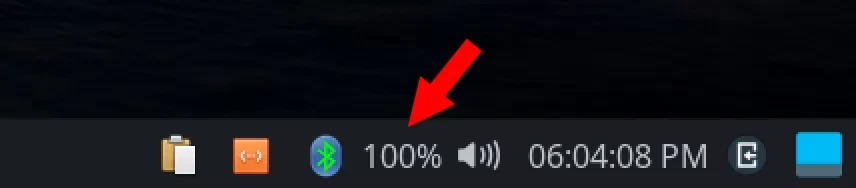
If you're using a wireless gaming controller on Linux, I'm gonna show you how to display the battery level in your Panel (the "taskbar" on Windows). This is a simple GenMon panel script for XFCE that doesn't require any third party software.
NOTE: If you're not using Manjaro XFCE, I'll try to show you alternate ways to configure the same script on your system! I won't be able to test these methods right away so your comments will be appreciated!!
Windows users can ignore this page since they probably had to install a bunch of drivers and software that came with their controller. That's fine, but here on Linux we do things the old fashioned way: we write our own code-- just like we used to do for our MySpace profiles.
First, here's my script:
#!/bin/bash
# Display 8BitDo, PS5, or other modern controller battery %
# by Rob215x
# On laptops, you might need to change /*/ to /*{sony,xbox,8bitdo,hid,gip}*/
val=$(cat /sys/class/power_supply/*/capacity 2>/dev/null | head -1)
if [ -z "$val" ]; then
    printf '\u200b'
else
    echo "$val%"
fi
In case you're wondering about the printf '\u200b', that's in there so GenMon shows an invisible, zero-width character in my Panel when there's no controller connected. I just thought it was cleaner that way.
Paste that into a text editor and save it as: ~/.local/bin/gamepad-battery
Open a terminal and run this command to make it executable:
chmod +x ~/.local/bin/gamepad-battery
XFCE
For my own Manjaro system, XFCE gives me everything I need while using a bare minimum of resources. The Generic Monitor plugin is included so I didn't need anything else.
How to configure:
- Right-click your panel > Panel > Panel Preferences
- Select the Items tab > Add > Generic Monitor
- Double-click the Generic Monitor icon to get the Configuration:
- Command: /home/[YOUR USERNAME]/.local/bin/gamepad-battery
- Label: unchecked
- Period(s): 10.00
- Use a single panel row: checked
- Font: Noto Sans 12 (or whatever you want)
MAKE SURE to change [YOUR USERNAME] to your actual username!! - Click OK and close the panel settings
KDE Plasma
This should cover Bazzite, Nobara, CachyOS, SteamOS Desktop Mode, etc. Remember, I don't run these distros so I can't directly test these instructions. PLEASE leave a comment if I made a mistake.
How to configure:
- Right-click your panel and select Enter Edit Mode (or Add or Manage Widgets)
- Click Add Widgets > Get New Widgets > Download New Plasma Widgets
- Search for Command Output [Plasma 6] and install it
- Drag the Command Output widget onto your panel
- Right-click the new widget > Configure Command Output:
- Command: /home/[YOUR USERNAME]/.local/bin/gamepad-battery
- Run every: 10000 ms (10 seconds)
- Font: Noto Sans, 12pt (adjust to match your panel)
MAKE SURE to change [YOUR USERNAME] to your actual username!! - Click OK and exit Edit Mode.
Using the Script
Once you have the script installed, it should just work but I wanted to point out a few details...
- IT MAY NOT WORK IMMEDIATELY!!!
This tripped me up for over an hour. I kept thinking I did something wrong so I kept removing the script or GenMon before it could actually do its thing. The battery percentage does NOT always show up right away...
Sometimes it only takes 10 seconds, sometimes it takes a minute, sometimes it doesn't show up until I start playing a game. I have no idea why it does that but I suspect it's the controller itself, not always updating the battery output, or taking a minute to calculate the actual percentage, or something. Just be aware of that!! - Standard Xbox controllers DO NOT show a battery percentage! This is probably because they use regular AA batteries. I used aftermarket lithium-ion packs in my Xbox controllers until I got fed up with them and switched to 8BitDo Xbox controllers. They DO report battery percent. Sometimes I use my PS5 controllers and those work fine too!
If you can confirm my install on distros other than Manjaro, please leave a comment! If your distro isn't listed, let me know and I'll try to walk you through it, then I can add those steps to help others!
